IconANTON RETRO
  • Home
  • News
    Recent News
    NintendoRetroIndustry
  • Reviews
    Recent Reviews
    HardwareSwitchWii3DS
  • Guides
    All Guides
    WiiWii USwitch3DS
  • Videos
  • Games
  • Mods
  • Portal
    Portal Home
    My PortfolioAdmin Dashboard
  • About
Home
News
Recent NewsNintendoRetroIndustry
Reviews
Recent ReviewsHardwareSwitchWii3DS
Guides
All GuidesWiiWii USwitch3DS
Videos
Games
Mods
Portal
Portal HomeMy PortfolioAdmin Dashboard
About
N64RecompLauncher Makes It Easier Than Ever to Track Native PC Ports of Retro Games
Home/News
antonretroemulationgaminggaming-newsn64nintendoNintendo Switchpcrecompretro-gamingsceneswitchNEWS

N64RecompLauncher Makes It Easier Than Ever to Track Native PC Ports of Retro Games

Anthony MicallefByAnthony Micallef
UpdatedApr 3, 2026
READ2 MIN
VIEWS662
Share

The retro gaming scene has been absolutely exploding with native PC recompilations lately. If you’ve been keeping up with the homebrew space, you’ve probably seen ports of classic N64 titles like Bomberman 64, Majora’s Mask, and others landing on PC with full 4K, high frame rate, and mod support. The problem? Keeping track of them all is a nightmare.

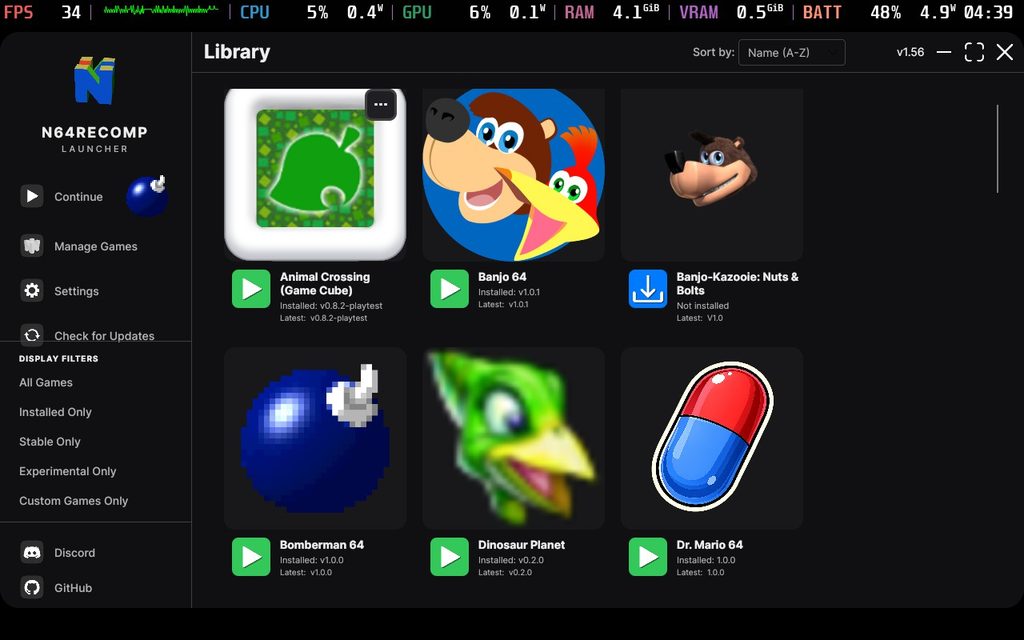
That’s exactly the problem N64RecompLauncher solves. Developed by SirDiabo on GitHub, this free open-source launcher gives you a clean, organized UI to browse every active recompilation project, see what’s available for your OS, and download them directly – all in one place.
What Is N64RecompLauncher?

Think of it as a Steam-style library for native retro ports. The launcher currently covers the bulk of N64 recompilations, but it also includes a handful of other platforms – notably the recently released Animal Crossing (GameCube) recomp and the Dragon Ball Z Budokai Xbox 360 recomp. It’s already broader than the name suggests.

N64RecompLauncher running on Steam Deck
Advertisement
Loading ad...

Using It on Steam Deck

Setup on Steam Deck is surprisingly painless. Download the Linux x64 build from GitHub, drop all the files into a folder on your desktop, and add the executable to Steam. From there you can access it in Game Mode with gamepad support – though fair warning, the gamepad navigation is still a little rough around the edges. Menus can be tricky to close, and some workflows feel clunky. Desktop Mode is still the smoothest way to get everything configured.

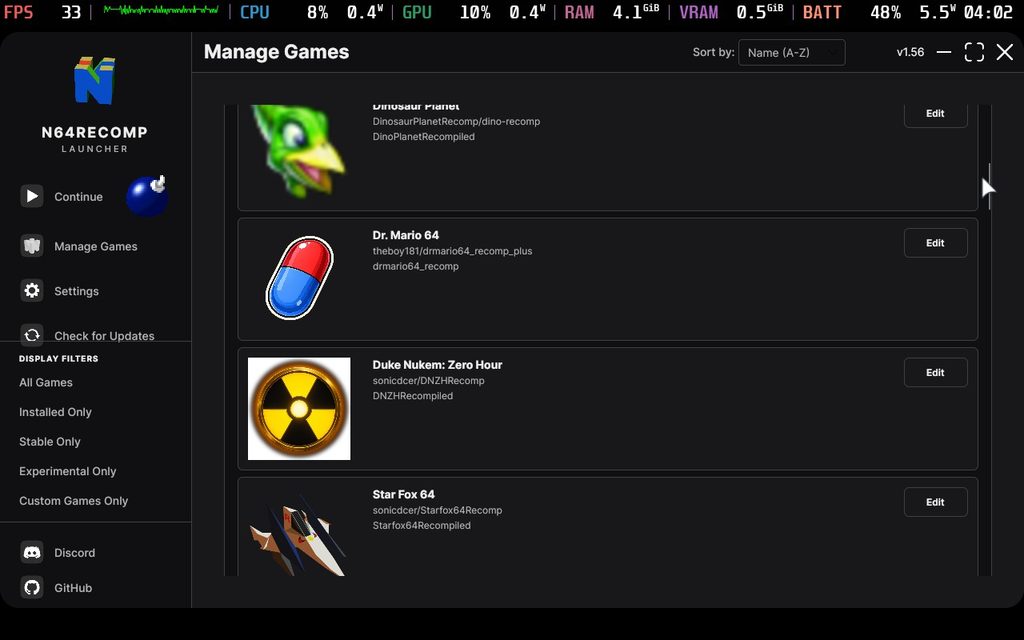
N64RecompLauncher game list

Linux Support Notes

Not every recompilation has a Linux build yet – the Animal Crossing GameCube recomp is one example where you’ll need to manually add the Windows build via Proton and add it to Steam yourself. For the N64 titles though, Linux x64 versions are almost universally available, making this a solid choice for Steam Deck users.

Worth It?

Absolutely. For anyone following the recomp scene, this is the missing piece that ties everything together. It won’t replace doing things manually for the edge cases, but as a discovery and management tool it’s excellent. With new recomps dropping regularly – Bomberman 64 landed just days ago – it’s great to have something that keeps pace. Highly recommended for any retro gaming enthusiast.

Download N64RecompLauncher on GitHub ->

Table of Contents

What Is N64RecompLauncher?
Using It on Steam Deck
Linux Support Notes
Worth It?

News Details

AuthorAnthony Micallef
Date3/27/2026
CategoryGeneral News
Jump to Comments
Advertisement
Loading ad...

Share This Article

About the Author

Anthony Micallef

Anthony Micallef

Anthony Micallef is the creator of Anton Retro, a platform dedicated to retro gaming enthusiasts. With years of experience in Nintendo homebrew and modding, he creates guides to help gamers get the most out of their consoles.

Anton Retro GitHub

What do you think about this story?

Leave a comment

0

Comments may be moderated before appearing.

Loading comments...

Table of Contents

What Is N64RecompLauncher?
Using It on Steam Deck
Linux Support Notes
Worth It?

News Details

AuthorAnthony Micallef
Date3/27/2026
CategoryGeneral News
Jump to Comments

Most Popular

01

How to Homebrew Your New Nintendo 3DS (11.17)

02

How to stream your New Nintendo 3DS

03

How to Setup an SDHC R4 Card

04

How to Homebrew Your Original Nintendo 3DS & 2DS (11.17)

05

Setup USB Loader GX

06

Top 10 Essential 3DS Homebrew Apps!

See More

Trending Now

NEWS

Pikuniku 2 Is Going 3D and It Was Hiding in a Dancing Meme the Whole Time

NEWS

The Legend of Zelda: Ocarina of Time Is Being Reborn on Nintendo Switch 2

NEWS

Nintendo Direct 6.9.2026: What We Could See Tomorrow

NEWS

Studio MDHR Announces Two New Cuphead Games, Including a Real Sega Master System Title

GUIDE

How to Install Banjo-Kazooie Recompiled (PC Port)

GUIDE

How to Install Ship of Harkinian (Ocarina of Time PC Port)

Advertisement
Loading ad...

Related

Jun 22, 2026

I Was on Perky Planet, Reecee’s New Nintendo Podcast

Jun 9, 2026

Nintendo Switch Sports Resort Fixes Everything the Previous Game Got Wrong

Jun 9, 2026

Nintendo Direct June 9 2026: Every Single Announcement, Ranked

N64RecompLauncher Makes It Easier Than Ever to Track Native PC Ports of Retro Games
Advertisement
Loading ad...
IconANTON RETRO

Retro gaming news, reviews, guides, and homebrew coverage. For Nintendo fans, modders, and collectors.

Explore
  • News
  • Reviews
  • Guides
  • Videos
  • Games
  • Mods
Information
  • Portal
  • About
  • Editorial Policy
  • Privacy Policy
  • Terms of Service
  • Sitemap
  • Changelog
  • Contact

78,000+ subscribers

Join 78,000+ retro gaming enthusiasts and never miss a video!

Subscribe Now

© 2026 Anthony Micallef - Anton Retro. All rights reserved.

DigitalOcean Referral Badge|Icons byControllercons|v5.0.0