IconANTON RETRO
  • Home
  • News
    Recent News
    NintendoRetroIndustry
  • Reviews
    Recent Reviews
    HardwareSwitchWii3DS
  • Guides
    All Guides
    WiiWii USwitch3DS
  • Videos
  • Games
  • Mods
  • Portal
    Portal Home
    My PortfolioAdmin Dashboard
  • About
Home
News
Recent NewsNintendoRetroIndustry
Reviews
Recent ReviewsHardwareSwitchWii3DS
Guides
All GuidesWiiWii USwitch3DS
Videos
Games
Mods
Portal
Portal HomeMy PortfolioAdmin Dashboard
About
How to Install The Legend of Zelda: The Minish Cap PC Port
Home/Guides
PCPC Port GuideguidesGUIDEtutorial

How to Install The Legend of Zelda: The Minish Cap PC Port

Anthony MicallefByAnthony Micallef
UPDATEDJun 4, 2026
READ2 MIN
VIEW1
Share

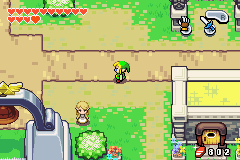
The Minish Cap PC port is a native decompilation of the Game Boy Advance classic, rebuilt to run directly on Windows without any emulator. It supports widescreen, high frame rates, and modern controller input.
What You Need

  • A Windows PC (64-bit)
  • A legal copy of The Legend of Zelda: The Minish Cap (GBA ROM from a cartridge you own)
  • The latest PC port release from the official GitHub

The port does not include game data. You must provide your own ROM file. This guide does not link to ROM download sources.

Step 1: Download the PC Port

Go to the official GitHub releases page and download the latest Windows build. Extract it to a folder such as C:\Games\MinishCap.

Step 2: Add Your ROM File

Place your Minish Cap .gba ROM in the same folder as the extracted port. The port detects it automatically on first launch.

Advertisement
Loading ad...

Step 3: Launch the Game

Run the .exe file. On first launch the port extracts assets from your ROM. This takes a few seconds and only happens once.

Step 4: Configure Controls

The port supports keyboard, Xbox controllers, and PlayStation controllers. Open the in-game settings to remap buttons.

Step 5: Adjust Display Settings

Enable widescreen, adjust the resolution multiplier, and toggle fullscreen from the settings menu. Running at 4x or 6x scale gives a clean pixel-perfect look on modern monitors.

Troubleshooting

  • Port does not detect my ROM – make sure the ROM is in the same directory as the executable
  • Wrong ROM version error – check the GitHub page for the exact supported version
  • Black screen on launch – try running as administrator or updating GPU drivers

Table of Contents

What You Need
Step 1: Download the PC Port
Step 2: Add Your ROM File
Step 3: Launch the Game
Step 4: Configure Controls
Step 5: Adjust Display Settings
Troubleshooting

Quick Info

PlatformPC
DifficultyStandard
Time2 MIN
Guide Typeguides
Advertisement
Loading ad...
Advertisement
Loading ad...

Share This Guide

About the Author

Anthony Micallef

Anthony Micallef

Anthony Micallef is the creator of Anton Retro, a platform dedicated to retro gaming enthusiasts. With years of experience in Nintendo homebrew and modding, he creates guides to help gamers get the most out of their consoles.

Anton Retro GitHub

How did this guide help?

Leave a comment or tip for other players

0

Comments may be moderated before appearing.

Loading comments...

Table of Contents

What You Need
Step 1: Download the PC Port
Step 2: Add Your ROM File
Step 3: Launch the Game
Step 4: Configure Controls
Step 5: Adjust Display Settings
Troubleshooting

Quick Info

PlatformPC
DifficultyStandard
Time2 MIN
Guide Typeguides
Advertisement
Loading ad...

Most Popular

01

How to Homebrew Your New Nintendo 3DS (11.17)

02

How to stream your New Nintendo 3DS

03

How to Setup an SDHC R4 Card

04

How to Homebrew Your Original Nintendo 3DS & 2DS (11.17)

05

Setup USB Loader GX

06

Top 10 Essential 3DS Homebrew Apps!

See More
Advertisement
Loading ad...

Trending Now

NEWS

Donkey Kong 64 Now Available on Nintendo 64 Classics – Nintendo Switch Online + Expansion Pack

NEWS

Nintendo Music Expands to Web Browsers, Tablets, Android Auto, and Apple CarPlay

NEWS

RUMOR: Nintendo Direct Now Reportedly Possible for June 9 as Summer Game Fest Week Heats Up

NEWS

Minecraft for Nintendo Switch 2 Rated by the ESRB

NEWS

suiCune: Pokemon Crystal Gets a Native PC Port Built From Scratch

GAME

suiCune (Pokemon Crystal PC Port)

Related

Today

How to Install Banjo-Kazooie Recompiled (PC Port)

Today

How to Install Ship of Harkinian (Ocarina of Time PC Port)

Feb 10, 2026

Miyoo Mini / Plus Starter Guide (Onion OS)

Advertisement
Loading ad...
How to Install The Legend of Zelda: The Minish Cap PC Port
Advertisement
Loading ad...
IconANTON RETRO

Retro gaming news, reviews, guides, and homebrew coverage. For Nintendo fans, modders, and collectors.

Explore
  • News
  • Reviews
  • Guides
  • Videos
  • Games
  • Mods
Information
  • Portal
  • About
  • Privacy Policy
  • Terms of Service
  • Sitemap
  • Changelog
  • Contact

78,000+ subscribers

Join 78,000+ retro gaming enthusiasts and never miss a video!

Subscribe Now

© 2026 Anthony Micallef - Anton Retro. All rights reserved.

DigitalOcean Referral Badge|Icons byControllercons|v5.0.0