IconANTON RETRO
  • Home
  • News
    Recent News
    NintendoRetroIndustry
  • Reviews
    Recent Reviews
    HardwareSwitchWii3DS
  • Guides
    All Guides
    WiiWii USwitch3DS
  • Videos
  • Games
  • Mods
  • Portal
    Portal Home
    My PortfolioAdmin Dashboard
  • About
Home
News
Recent NewsNintendoRetroIndustry
Reviews
Recent ReviewsHardwareSwitchWii3DS
Guides
All GuidesWiiWii USwitch3DS
Videos
Games
Mods
Portal
Portal HomeMy PortfolioAdmin Dashboard
About
How to Play Triforce Arcade Games on Wii
Home/Guides
WiiMediumguidesv4.3GUIDEtutorial

How to Play Triforce Arcade Games on Wii

Anthony MicallefByAnthony Micallef
UPDATEDJan 17, 2026
READ1 MIN
VIEWS50
Share

What is Triforce?

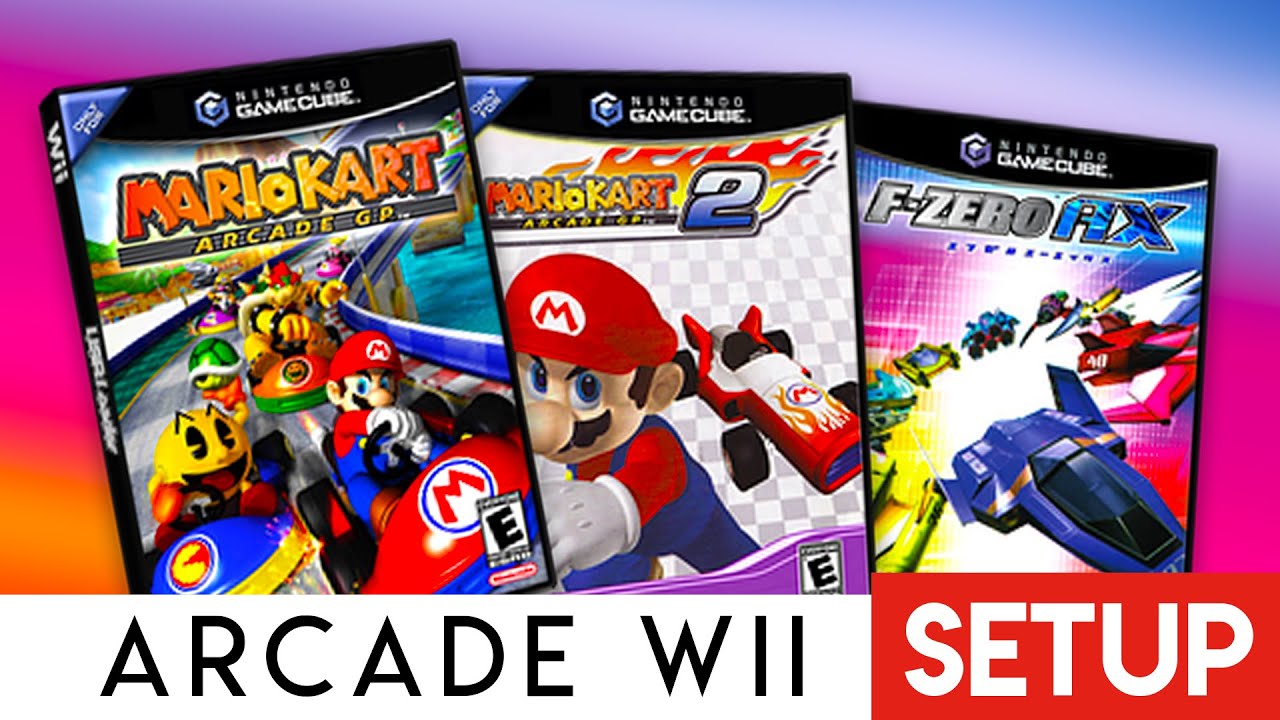
The Triforce arcade system was jointly developed by Nintendo, Sega, and Namco. It’s based on GameCube hardware, which means some games can be played on Wii with the right tools.
Step 1: Setup Nintendont

The modern way to play Triforce games is using Nintendont. Old methods like “QuadForce” are obsolete.

  1. Download Nintendont and place it in /apps/Nintendont/ on your SD card.
  2. Launch Nintendont from the Homebrew Channel.
  3. Go to Settings and enable “Triforce Arcade Mode”. This enables coin-op features and native arcade menus.

Step 2: Installing Games

Triforce games use the same folder structure as GameCube games. You need the game files in ISO format.

  1. Create a folder named games on the root of your SD or USB.
  2. Create a subfolder for your game (e.g., /games/Mario Kart GP/).
  3. Rename your game file to game.iso and place it inside.

Compatible Games

Not all Triforce games are compatible, but the big ones run perfectly:

  • Mario Kart Arcade GP 1 & 2
  • F-Zero AX (The arcade version of GX)
  • Virtua Striker 4

Controls

Since these are arcade games, they often require unique inputs. A GameCube controller is highly recommended. Nintendont automatically maps arcade buttons to the GameCube controller layout.

Table of Contents

What is Triforce?
Step 1: Setup Nintendont
Step 2: Installing Games
Compatible Games
Controls

Quick Info

PlatformWii
DifficultyMedium
Time1 MIN
Guide Typeguides
Version4.3

Share This Guide

About the Author

Anthony Micallef

Anthony Micallef

Anthony Micallef is the creator of Anton Retro, a platform dedicated to retro gaming enthusiasts. With years of experience in Nintendo homebrew and modding, he creates guides to help gamers get the most out of their consoles.
Anton Retro GitHub

How did this guide help?

Leave a comment or tip for other players

0

Comments may be moderated before appearing.

Loading comments...

Table of Contents

What is Triforce?
Step 1: Setup Nintendont
Step 2: Installing Games
Compatible Games
Controls

Quick Info

PlatformWii
DifficultyMedium
Time1 MIN
Guide Typeguides
Version4.3

Most Popular

01

How to Homebrew Your New Nintendo 3DS (11.17)

02

How to stream your New Nintendo 3DS

03

How to Setup an SDHC R4 Card

04

How to Homebrew Your Original Nintendo 3DS & 2DS (11.17)

05

Top 10 Essential 3DS Homebrew Apps!

06

How to Homebrew Wii U (Aroma)

See More

Trending Now

NEWS

RUMOR: Nintendo Direct Reportedly Incoming for June, With Surprises Still Under Wraps

NEWS

Minecraft for Nintendo Switch 2 Rated by the ESRB

NEWS

suiCune: Pokemon Crystal Gets a Native PC Port Built From Scratch

GAME

suiCune (Pokemon Crystal PC Port)

GAME

Pokemon Platinum (Unofficial PC Port)

NEWS

Pokemon Platinum Gets Unofficial Native PC Port

Related

Feb 4, 2026

Dolphin Emulator Set Up Guide (Netplay, Controls, & More!)

Jan 17, 2026

How to Homebrew Your Nintendo Wii

Jan 17, 2026

Setup USB Loader GX

How to Play Triforce Arcade Games on Wii
IconANTON RETRO

Retro gaming news, reviews, guides, and homebrew coverage. For Nintendo fans, modders, and collectors.

Explore
  • News
  • Reviews
  • Guides
  • Videos
  • Games
  • Mods
Information
  • Portal
  • About
  • Privacy Policy
  • Terms of Service
  • Sitemap
  • Changelog
  • Contact

78,000+ subscribers

Join 78,000+ retro gaming enthusiasts and never miss a video!

Subscribe Now

© 2026 Anthony Micallef - Anton Retro. All rights reserved.

DigitalOcean Referral Badge|Icons byControllercons|v5.0.0