IconANTON RETRO
  • Home
  • News
    Recent News
    NintendoRetroIndustry
  • Reviews
    Recent Reviews
    HardwareSwitchWii3DS
  • Guides
    All Guides
    WiiWii USwitch3DS
  • Videos
  • Games
  • Mods
  • Portal
    Portal Home
    My PortfolioAdmin Dashboard
  • About
Home
News
Recent NewsNintendoRetroIndustry
Reviews
Recent ReviewsHardwareSwitchWii3DS
Guides
All GuidesWiiWii USwitch3DS
Videos
Games
Mods
Portal
Portal HomeMy PortfolioAdmin Dashboard
About
How to Create a Custom YSMenu Theme
Home/Guides
dsMediumguidesGUIDEtutorial

How to Create a Custom YSMenu Theme

Anthony MicallefByAnthony Micallef
UPDATEDJan 17, 2026
READ1 MIN
VIEWS2,706
Share

Create Stunning YSMenu Themes

SignaPic YasUI is the premier tool for customizing YSMenu (the custom firmware for R4 and other DS flashcarts). It allows you to transform the functional but plain interface into a personalized masterpiece.
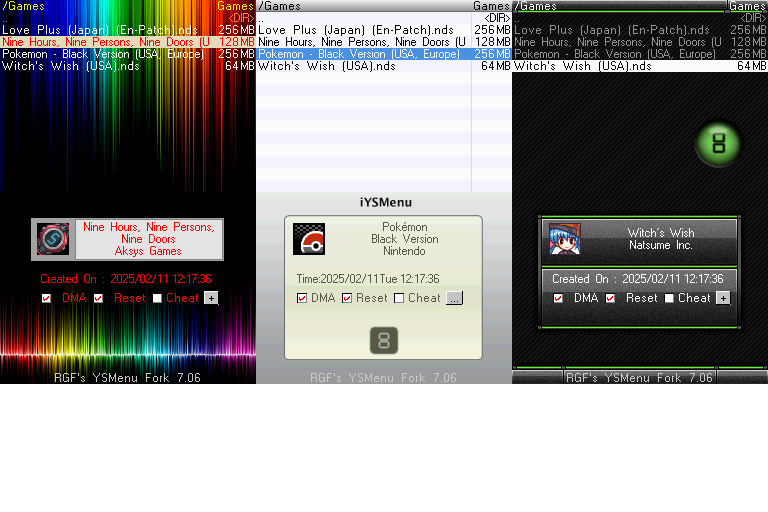
The Setup

  1. Obtain the YSMenu theme template files (256×192 bitmapped images).
  2. Launch YasUI on your PC.
  3. Import your artwork and use the previewer to ensure text and icons don’t clash with your background.

BIT15 Color Conversion

The DS hardware uses a unique 15-bit color space. YasUI includes a built-in converter that translates standard RGB HEX codes into the BIT15 values required for your YSMenu.ini configuration file. This ensures your theme colors look exactly as intended on the actual handheld.

Installation

Export your finished theme and copy the folder to /_ds_menu/themes/ on your flashcart’s SD card. You can then select your new theme from the YSMenu settings menu.

Table of Contents

Create Stunning YSMenu Themes
The Setup
BIT15 Color Conversion
Installation

Quick Info

Platformds
DifficultyMedium
Time1 MIN
Guide Typeguides

Share This Guide

About the Author

Anthony Micallef

Anthony Micallef

Anthony Micallef is the creator of Anton Retro, a platform dedicated to retro gaming enthusiasts. With years of experience in Nintendo homebrew and modding, he creates guides to help gamers get the most out of their consoles.

Anton Retro GitHub

How did this guide help?

Leave a comment or tip for other players
0

Comments may be moderated before appearing.

Loading comments...

Table of Contents

Create Stunning YSMenu Themes
The Setup
BIT15 Color Conversion
Installation

Quick Info

Platformds
DifficultyMedium
Time1 MIN
Guide Typeguides

Most Popular

01

How to Homebrew Your New Nintendo 3DS (11.17)

02

How to stream your New Nintendo 3DS

03

How to Homebrew Your Original Nintendo 3DS & 2DS (11.17)

04

Setup USB Loader GX

05

Top 10 Essential 3DS Homebrew Apps!

06

How to Homebrew Wii U (Aroma)

See More

Trending Now

NEWS

RUMOR: Nintendo Direct Reportedly Incoming for June, With Surprises Still Under Wraps

NEWS

Minecraft for Nintendo Switch 2 Rated by the ESRB

NEWS

suiCune: Pokemon Crystal Gets a Native PC Port Built From Scratch

GAME

suiCune (Pokemon Crystal PC Port)

GAME

Pokemon Platinum (Unofficial PC Port)

NEWS

Pokemon Platinum Gets Unofficial Native PC Port

Related

Feb 4, 2026

How To Play Pokemon DS Games ONLINE (2021)

Jan 17, 2026

How to Setup an SDHC R4 Card

Feb 10, 2026

Miyoo Mini / Plus Starter Guide (Onion OS)

How to Create a Custom YSMenu Theme
IconANTON RETRO

Retro gaming news, reviews, guides, and homebrew coverage. For Nintendo fans, modders, and collectors.

Explore
  • News
  • Reviews
  • Guides
  • Videos
  • Games
  • Mods
Information
  • Portal
  • About
  • Privacy Policy
  • Terms of Service
  • Sitemap
  • Changelog
  • Contact

78,000+ subscribers

Join 78,000+ retro gaming enthusiasts and never miss a video!

Subscribe Now

© 2026 Anthony Micallef - Anton Retro. All rights reserved.

DigitalOcean Referral Badge|Icons byControllercons|v5.0.0